
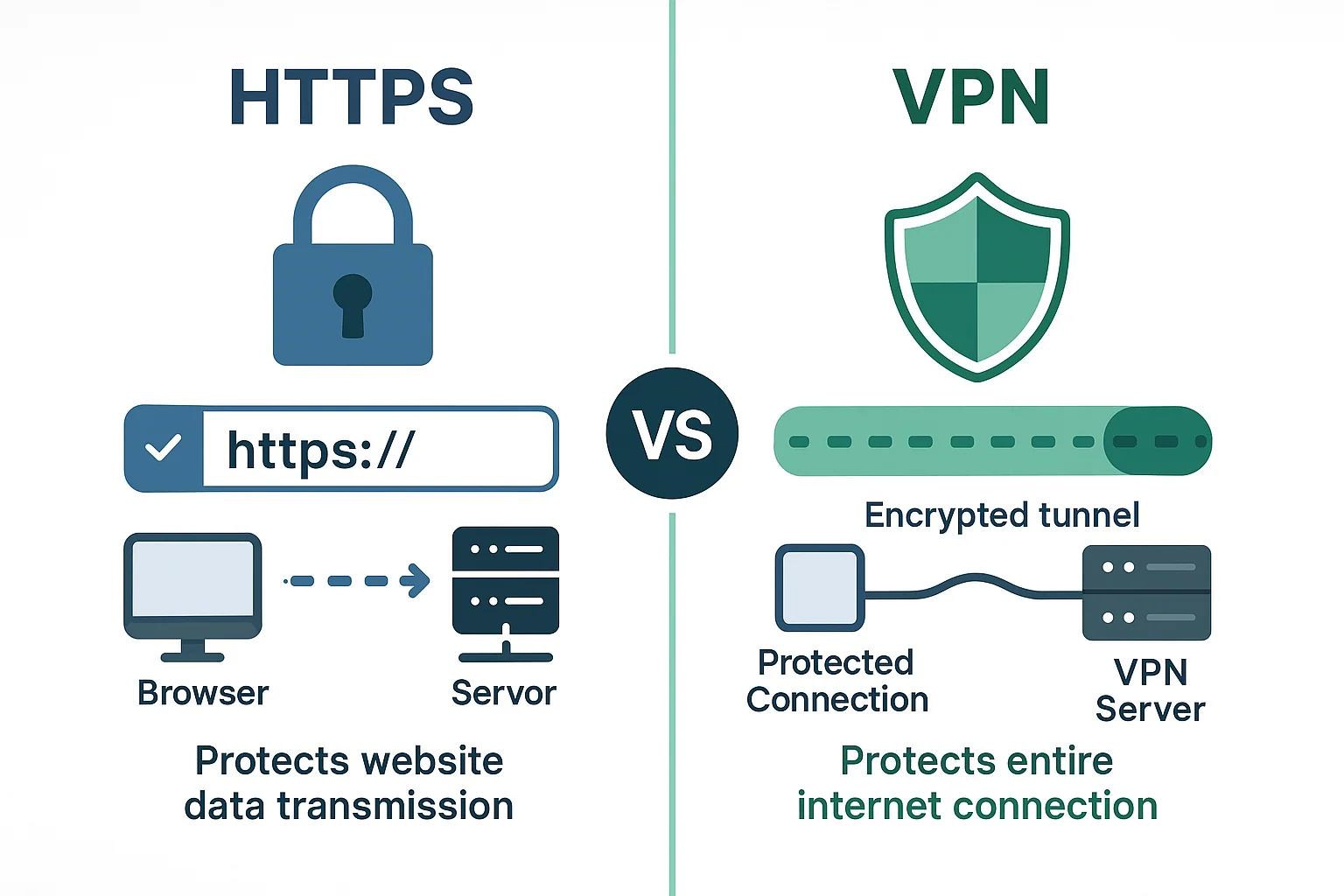
And when you log into your bank, you expect ironclad protection. HTTPS vs VPN for banking security is a question many users ask, yet most assume HTTPS alone does the job.
TL;DR
- HTTPS encrypts the connection between your browser and the bank, but it does not hide your IP address or protect against compromised networks.
- A VPN adds a secure tunnel that encrypts all traffic, masks your location, and defends against man-in-the-middle attacks on public Wi-Fi.
- Using both HTTPS and a reputable no-logs VPN provides layered security, significantly reducing the risk of credential theft.
- Even if HTTPS is broken, a VPN’s tunnel still encrypts data, offering a fallback safeguard.
Why HTTPS Alone Isn’t Sufficient for Banking
HTTPS (Hypertext Transfer Protocol Secure) uses TLS to encrypt data in transit. It stops eavesdroppers from reading your login credentials as they travel over the internet. However, it only secures the link between your device and the bank’s server. It does not protect the network you’re on, nor does it conceal your IP address.
How HTTPS Protects Your Session
When you type https:// into your browser’s address bar, the browser initiates a TLS (Transport Layer Security) handshake with the bank’s web server. During this handshake, the server presents a digital certificate that is signed by a trusted Certificate Authority (CA). The browser verifies that the certificate is valid, that it matches the domain name, and that it has not been revoked. Once verification succeeds, the server and the browser agree on a symmetric encryption key, which is then used to encrypt all HTTP traffic for the duration of the session. This process ensures that any data—login credentials, account numbers, transaction details—traveling between your device and the bank’s server is scrambled in a way that passive eavesdroppers cannot decode without the private key, which only the server possesses.
Limitations of HTTPS in Real‑World Banking
Despite its strong encryption, HTTPS has several blind spots that attackers can exploit:
- Network‑level threats: On an unsecured Wi‑Fi hotspot, a malicious actor can perform a man‑in‑the‑middle (MitM) attack that attempts to downgrade the connection to plain HTTP or inject malicious code before the TLS handshake completes. While modern browsers warn users about such downgrades, sophisticated attackers may still succeed on outdated devices.
- IP address exposure: HTTPS encrypts the payload but does not hide your IP address. Your ISP, the Wi‑Fi router, or any intermediate ISP can see that you are communicating with a particular bank’s domain, which can be used for traffic analysis or targeted phishing.
- DNS manipulation: If the DNS queries that resolve your bank’s domain are hijacked—either through a compromised router or a malicious DNS resolver—your browser may be directed to a fraudulent site that also supports HTTPS, complete with a valid certificate obtained via a compromised CA. This scenario defeats the assumption that “HTTPS guarantees authenticity.”
- Browser extensions and malware: Even with a perfect TLS tunnel, a malicious browser extension or resident malware can capture keystrokes, screenshots, or clipboard data before it ever reaches the encrypted channel.
- Certificate trust chain errors: Users sometimes click through browser warnings about expired or mismatched certificates. Doing so effectively nullifies the protection HTTPS provides.
What a VPN Actually Does for Your Banking Traffic
A Virtual Private Network creates an encrypted tunnel between your device and a VPN server located in a data center of your choosing. All traffic—whether it is HTTP, HTTPS, DNS, or even non‑web protocols—passes through this tunnel before reaching the broader internet. The key security benefits for banking are:
- End‑to‑end encryption beyond the local network: Even if you are on a compromised public Wi‑Fi, the VPN encrypts your packets before they leave your device, preventing any local attacker from reading or altering them.
- IP address masking: Your public IP address appears to be the VPN server’s address, obscuring your true geographic location and making it harder for attackers to target you based on network‑level information.
- Secure DNS resolution: Reputable VPNs route DNS queries through encrypted channels, eliminating the risk of DNS hijacking that could otherwise redirect you to a phishing site.
- Protection against Wi‑Fi spoofing: Some VPN clients include a “kill switch” that instantly blocks all internet traffic if the VPN connection drops, ensuring that you never unintentionally fall back to an insecure network.
Choosing a Reputable VPN for Banking
Not every VPN service offers the level of security required for sensitive financial activities. When evaluating options, consider the following criteria:
- No‑logs policy: The provider should explicitly state that it does not retain connection logs, IP addresses, or browsing metadata. Look for independent audits that confirm these claims.
- Strong encryption standards: AES‑256‑GCM encryption combined with modern key exchange protocols (e.g., WireGuard, OpenVPN with UDP) offers robust protection without excessive latency.
- Kill switch functionality: An automatic kill switch prevents traffic leaks if the VPN tunnel unexpectedly disconnects.
- DNS leak protection: The client should verify that DNS requests are never sent to the ISP’s resolvers.
- Multi‑hop routing (optional): Some providers let you route traffic through two VPN servers in different jurisdictions, adding an extra layer of anonymity.
- Compatibility with banking apps: Ensure the VPN client works on the operating systems and mobile devices you use for banking, and that it does not interfere with two‑factor authentication (2FA) mechanisms.
Practical Scenarios: Banking on Public Wi‑Fi, Mobile Networks, and Home Routers
Public Wi‑Fi cafés or airports: These networks often lack proper segmentation, allowing any device on the same SSID to sniff traffic. Even though HTTPS encrypts the payload, a determined attacker could launch SSL‑stripping attacks or inject malicious JavaScript into HTTP pages that precede the login flow. Connecting through a VPN eliminates the attack surface by encrypting everything before it reaches the compromised router.
Mobile data connections: Cellular networks are generally more secure than open Wi‑Fi, but they are not immune to rogue base stations (e.g., IMSI catchers). A VPN adds an extra barrier that prevents any intercepted cellular traffic from being readable.
Home routers with outdated firmware: Many consumers neglect router firmware updates, leaving devices vulnerable to remote exploitation. An attacker who gains control of the router could perform DNS poisoning or inject malicious scripts into unencrypted traffic. A VPN bypasses the compromised router for all outbound traffic, ensuring that the bank’s HTTPS session remains untampered.
Layered Defense: Combining HTTPS, VPN, and Device Security
Relying on a single security measure creates a single point of failure. The most resilient approach stacks multiple controls:
- Device hygiene: Keep operating systems, browsers, and banking apps up to date. Enable built‑in firewalls and anti‑malware tools.
- Strong authentication: Use multi‑factor authentication (SMS, authenticator apps, or hardware tokens) for every banking login.
- HTTPS verification: Always confirm the lock icon and check that the URL begins with
https://. Avoid clicking “continue” on certificate warnings. - VPN tunnel: Activate a reputable VPN before opening your banking website or app, especially on networks you do not fully control.
- Secure DNS: Prefer DNS over HTTPS (DoH) or DNS over TLS (DoT) provided by trusted resolvers, which many VPNs support out of the box.
- Session management: Log out of banking sessions after use and clear browser cookies or app cache to prevent session hijacking.
By treating each layer as a complementary safeguard, you dramatically reduce the probability that a single breach will expose your financial credentials.
Common Misconceptions and Pitfalls
- “HTTPS is enough if I see the padlock”: The padlock only confirms that the connection to the server is encrypted; it says nothing about the security of the network you are on.
- “Free VPNs are just as safe as paid ones”: Many free services log user activity, inject ads, or sell bandwidth, which can introduce new privacy risks.
- “I don’t need a VPN on my home Wi‑Fi because it’s my own network”: Home networks can be compromised by malware-infected IoT devices, misconfigured routers, or neighbor intrusion.
- “Using a VPN will slow down my banking experience”: Modern VPN protocols are highly optimized; the latency added is typically negligible compared to the security benefit.
- “VPNs protect me from phishing sites”: A VPN encrypts traffic but does not verify the legitimacy of the destination website. Phishing protection still relies on user vigilance and anti‑phishing tools.
Step‑by‑Step Checklist for Secure Online Banking
- Update your operating system, browser, and banking apps to the latest versions.
- Enable built‑in device encryption and a strong screen lock (PIN, password, biometrics).
- Install a reputable, no‑logs VPN client and configure it to connect automatically on untrusted networks.
- Verify that the VPN’s kill switch and DNS leak protection are active.
- Before logging in, confirm the URL starts with
https://and that the certificate details match the bank’s official domain. - Activate multi‑factor authentication for your banking account.
- Use a dedicated browser profile or private/incognito window for banking sessions to avoid cross‑site tracking.
- After completing your session, log out, clear cookies, and close the browser or app.
- Periodically review VPN connection logs (if provided) to ensure no unexpected IP changes or disconnections occurred during your session.
- Conduct a quick network scan on your home router to ensure no unknown devices are connected, and apply firmware updates as needed.
References
- HTTPS - Wikipedia -- Provides definition and technical overview of HTTPS
- Virtual private network - Wikipedia -- Explains how VPNs work and their security properties
- NIST Special Publication 800-63B: Digital Identity Guidelines -- Authority on authentication and secure communication standards for banking


No comments yet. Be the first to share your thoughts!
Leave a Comment